Writing API Documentation Using Markdown: A Practical Guide for Developers
Good docs matter a lot in our API-focused world. They are as big a deal as the code itself. Whether you are building a public REST API, an internal microservice, or a SaaS platform, clear and organized documentation directly affects how many people use it, how developers feel about it, and how easy it is to maintain over time.
Writing API documentation with Markdown is super efficient and scales well. It is lightweight, easy to read, and works brilliantly with version control. That is why Markdown has become the go-to choice for technical documentation across the industry.
This guide will show you how to write API docs effectively using Markdown. We will cover structure, formatting tips, code snippets, automation tricks, and even SEO strategies to help your documentation get discovered.

Why Use Markdown for API Documentation?
Before we talk about structure or formatting, let us understand why so many developers pick Markdown for technical docs.
1. Simplicity and Readability
Markdown is plain text, plain and simple. Writing it is a breeze. Reading the raw file is easy too. You will not find any complex styling syntax, so the learning curve stays incredibly minimal. Even folks without a tech background can grasp Markdown content without needing to see it rendered.
2. Version Control Friendly
Markdown files are just text, which helps a ton. They pair perfectly with Git. Tracking changes becomes simple. You can even add doc updates to your pull requests. This is exactly the Docs-as-Code philosophy that modern DevOps teams swear by—docs grow right alongside your code.
3. Compatibility With Documentation Tools
Markdown plays nice with lots of tools. Think static site generators like MkDocs or Docusaurus. GitHub READMEs render it natively. Swagger/OpenAPI overlays work with it, and even CI/CD pipelines can publish your documentation automatically. Write once, publish everywhere.
Core Structure of API Documentation in Markdown
Good API docs usually follow a structure that is easy to predict and navigate. Here is a layout we recommend.
1. Title and Introduction
Begin with a clear H1 title and a quick overview. Your intro needs to cover what the API does, who it is for, the base URL, and a quick look at authentication. This is the first thing a developer reads, so make it count.
2. Base URL and Environment Information
Developers must know the endpoints right away. Clearly separate production and sandbox environments. This prevents people from accidentally hitting production during testing.
Production: https://api.example.com/v1
Sandbox:    https://sandbox.api.example.com/v1
3. Authentication Section
You have got to explain authentication early on and very clearly. Include the authentication type (such as Bearer, Basic, or OAuth 2.0), show the header format, mention any expiration rules, and provide a sample request.
Authorization: Bearer YOUR_API_KEYA well-written authentication section alone can save your support team hundreds of tickets. If you want to avoid common documentation mistakes, pay extra attention to getting this section right.

4. Endpoints Documentation Structure
Every endpoint should stick to the same consistent structure. Here is a recommended format:
- HTTP Method + Path:
POST /payments - Description: A concise one-liner about what this endpoint does.
- Request Headers: Formatted as a table showing header name, type, required flag, and description.
- Request Body: A JSON code block with a realistic example.
- Response: A JSON code block showing the expected successful response.
- Status Codes: A table mapping codes to their meanings (200, 400, 401, 500).
Here is an example of a request body for a payment endpoint:
{
  "amount": 1000,
  "currency": "USD",
  "customer_id": "cust_12345"
}
And the corresponding response:
{
  "id": "pay_67890",
  "status": "success",
  "amount": 1000
}
Being consistent across all endpoints makes things much easier to read. Developers work faster that way.
Best Practices for Writing API Documentation in Markdown
1. Use Clear Heading Hierarchy
Markdown lets you use headings from H1 all the way to H6. Use these smartly. H1 should be your API name. H2 works for big sections like Authentication or Endpoints. Individual endpoints get H3. For subsections (Request, Response, Errors), use H4. A clear hierarchy helps with SEO and makes docs easier to navigate. If you are a technical writer working with Markdown, nailing the heading structure is one of the most impactful things you can do.
2. Use Code Blocks Properly
Always use triple backticks for any code blocks, and make sure to specify the language type. json, bash, curl, javascript, or python are good examples. This helps most documentation platforms highlight the syntax correctly.
{
  "id": "123",
  "status": "active"
}
3. Provide cURL Examples
Developers absolutely love examples they can just copy and paste. Try to include examples in several languages if you can.
curl -X POST https://api.example.com/v1/payments   -H "Authorization: Bearer YOUR_API_KEY"   -H "Content-Type: application/json"   -d '{
    "amount": 1000,
    "currency": "USD"
  }'
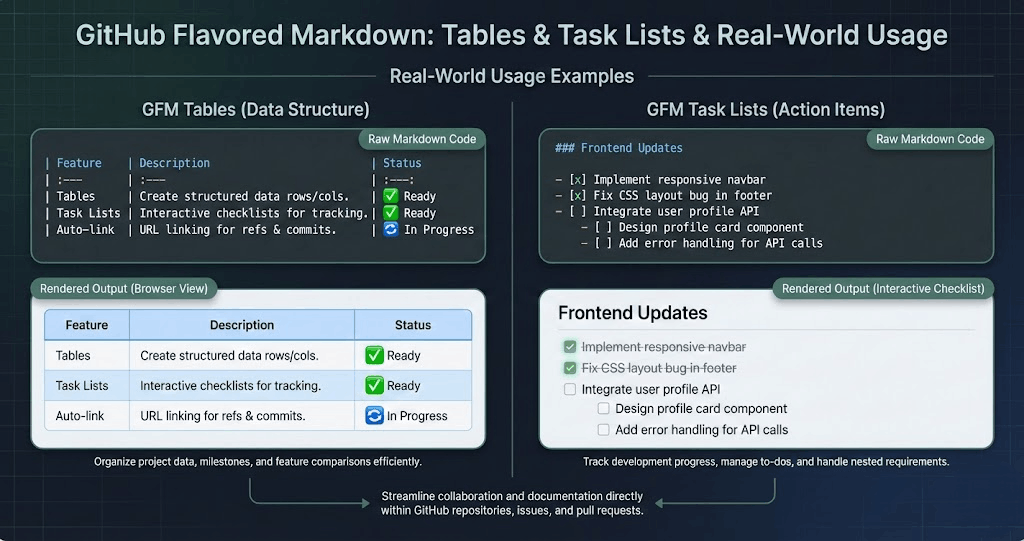
4. Use Tables for Parameter Documentation
Tables help organize parameter descriptions. They are easy to scan. Do not write long paragraphs trying to explain parameters—just use a table.
| Parameter | Type | Required | Description |
|---|---|---|---|
amount |
Integer | Yes | Amount in cents |
currency |
String | Yes | ISO currency code |
customer_id |
String | Yes | Unique customer identifier |
5. Document Errors Thoroughly
Good error documentation means fewer support tickets. You should include error codes, show example error responses, and add troubleshooting notes. Make sure to explain what developers need to do for each error they might hit.
{
  "error": {
    "code": "INVALID_AMOUNT",
    "message": "Amount must be greater than zero."
  }
}
Organizing Large APIs in Markdown
A single Markdown file is totally fine for small APIs. But for bigger systems, you have got options.
Option 1: Multiple Markdown Files
Organize your documentation into separate files by domain:
docs/
├── index.md
├── authentication.md
├── payments.md
├── customers.md
├── errors.md
This keeps your documentation organized and easier to maintain. Each file is version-controlled independently, making PR reviews much cleaner.
Option 2: Static Site Generators
You could use tools like MkDocs, Docusaurus, GitBook, or Sphinx with Markdown extensions. These offer sidebar navigation, built-in search functionality, documentation versioning, and theming and branding options. For a deeper look at the Docs-as-Code approach with these tools, check out our complete Docs-as-Code guide.
Writing for Developer Experience (DX)
Markdown is just the wrapper; clear writing makes the real difference.
Write in Plain Language
Do not use marketing fluff. Skip the unnecessary jargon. Avoid overly academic explanations. Instead, go for short sentences. Use active voice. Give practical examples. If you are transitioning from Word-based docs to Markdown, our Markdown basics guide will help you hit the ground running.
Assume Developer Intent
Guess what developers want to do. They generally want to authenticate, make a request, see a response, and handle errors. Build your documentation around these exact steps. Meet them where they are, not where you think they should be.

Integrating OpenAPI with Markdown
Lots of teams mix Markdown docs with OpenAPI specifications. Here is how that workflow might look:
- Define your API schema in OpenAPI (YAML/JSON).
- Auto-generate your reference documentation using tools like Redocly or Swagger UI.
- Enhance it with Markdown guides and tutorials.
This combo approach offers the best of both worlds. You get accuracy from auto-generated endpoints, plus Markdown gives you helpful manual explanations and onboarding guides that machines cannot write.
Versioning API Documentation
Versioning is super important. Without it, developers will integrate against outdated contracts and blame your API when things break.
Best Practices
- Put the version right in your URL, like
/v1/. - Keep docs specific to each version.
- Clearly mark any deprecated endpoints.
- Always keep your change logs up to date.
When you deprecate an endpoint, make it obvious:
⚠️ This endpoint is deprecated and will be removed in v2.
Maintaining a changelog is equally important:
## Changelog

### v1.2.0
- Added refund endpoint
- Improved error responses

### v1.1.0
- Added pagination to list endpoints
- Fixed currency validation
SEO Considerations for Public API Documentation
If your API docs are public, search engine optimization is a big deal. Developers search for solutions constantly, and your documentation should show up.
1. Use Keyword-Rich Headings
Write headings that developers would actually search for. Examples include "REST API Authentication Using Bearer Tokens," "How to Create a Payment via API," and "API Error Handling Best Practices."
2. Add FAQ Sections
FAQ sections actually help people find your docs through search engines. Address common questions developers have, like how to reset API keys or handle rate limiting.
3. Optimize Meta Descriptions
If you are using static site generators, configure meta titles, add meta descriptions, and set canonical URLs. This is standard SEO hygiene that many API docs neglect. If your documentation is also available as a polished PDF, tools like Toflio can help you design print-ready documents from your Markdown source.
Maintaining API Documentation Over Time
Docs need to change as your code changes. Stale documentation is worse than no documentation because it actively misleads developers.
1. Enforce Documentation in Pull Requests
Add a checklist for documentation. Is the endpoint documented? Was an example added? Are error codes updated? Making documentation part of your "Definition of Done" ensures it never falls behind.
2. Automate Where Possible
Auto-generate endpoint specifications from your OpenAPI schema. Run documentation linting with tools like Vale. Validate your code examples in CI. The more automation you have, the less manual effort required to keep docs accurate.
3. Review Documentation Regularly
Ask yourself some hard questions on a regular cadence. Are the examples outdated? Do response formats still match the real API? Have you removed deprecated endpoints from the docs?
Common Mistakes to Avoid
1. Inconsistent Formatting
Readers get confused when you switch styles between endpoints. Stick to one structure across every endpoint. Consistency builds trust and reduces cognitive load.
2. Missing Examples
APIs without examples are incredibly frustrating. Always provide real, working sample requests and responses. Developers learn by example, not by reading abstract descriptions.
3. Overly Long Explanations
Keep your explanations short and to the point. Developers want clarity, not a novel. If something can be shown in a code block, show it rather than describe it.
4. Ignoring Error Handling
Undocumented errors will lead to integration failures and frustrated developers filing support tickets. Document every error code your API can return.

Advanced Tips for Professional API Documentation
Include Quick Start Guides
Give developers a bare-bones, working example that gets them from zero to their first successful API call in under five minutes. This is the single most important piece of documentation you can write.
Add Use Case Guides
Beyond just listing endpoints, explain real-world scenarios like processing recurring payments, handling webhooks, or paginating large result sets. These guides really boost adoption because they show developers how the pieces fit together.
Provide SDK References
If you have SDKs, link to them prominently. Include installation instructions right in the documentation so developers can get started immediately.
npm install example-sdkTest Your Documentation
Use tools like Postman to create a collection that mirrors your documentation examples. Run these collections in CI to ensure every documented example actually works against your live API.
FAQ
How do I choose between Markdown and OpenAPI?
Answer: Use both. OpenAPI is great for auto-generating reference docs (endpoints, schemas). Markdown is better for guides, tutorials, and conceptual explanations. The combination gives you comprehensive, developer-friendly documentation.
What is the best tool for hosting API docs?
Answer: It depends on your stack. Docusaurus is excellent for React teams. MkDocs with the Material theme is popular for Python projects. Redocly is specifically designed for OpenAPI-first workflows.
How often should API docs be updated?
Answer: Every time the API changes. The best practice is to include documentation updates in the same pull request as the code change. This way, docs never fall out of sync.
Should I document internal APIs?
Answer: Absolutely. Internal APIs change hands frequently as teams evolve. Good internal docs reduce onboarding time for new team members and prevent "tribal knowledge" from being lost when people leave.
Conclusion
Using Markdown to write API documentation is practical and powerful. It is simple, flexible, and works well with how we develop today. That is why it is the top choice for technical documentation.
Want great API docs? Stick to a consistent structure. Use clear headings and tables. Give realistic examples. Thoroughly document those errors. Keep your docs versioned and maintained. Think about the developer experience. Make them easy to find if they are public.
Good API docs mean less trouble integrating. They cut down on support costs. More developers will use your API. In today's API market, being clear is not just nice—it is a smart strategy.
And when it is time to deliver those docs as a polished deliverable, Toflio's Markdown to PDF converter makes that last mile seamless. Write once in Markdown, publish everywhere.