Create a Developer Resume Using Markdown (A Smarter Way to Do It)
Most developer resumes look the same.
A Word file. A template. A long list of technologies. Some job descriptions. And that’s it.
But if you're a developer, shouldn’t your resume reflect how you actually work?
That’s where Markdown comes in. If you are new to it, our Mastering Markdown Basics guide is a great starting point.
Creating a developer resume using Markdown isn’t just about formatting text. It shows you understand clean structure, documentation, and version control. It’s simple, practical, and honestly — it just makes sense for developers.
Let’s break it down in a way that’s easy to follow.
Why Use Markdown for a Resume?
You probably already use Markdown for README files, GitHub documentation, or project notes. So why not use it for your resume too?
Here’s why it works really well.
1. It’s Clean and Simple
Markdown doesn’t let you overdesign things. No weird fonts. No strange spacing issues. No formatting breaking when someone opens it in another computer.
It’s just text. Structured properly.
And recruiters actually prefer that. They don’t care about fancy design as much as they care about clarity.
2. It Shows You're Technical
If your resume is a well-structured README.md file on GitHub, it says something about you. It shows:
- You understand version control
- You’re comfortable with documentation
- You care about organization
It’s subtle, but it matters.
3. It’s Easy to Update
Need to tweak your resume for a backend role instead of frontend?
- Just duplicate the file.
- Edit some sections.
- Commit.
- Push.
No fighting with Word formatting for 20 minutes, which happens more often than it should.
What Should a Developer Resume Include?
Before we talk about formatting, let’s talk about content. Because format alone won’t save a weak resume.
A solid developer resume should include:
- Contact information
- A short professional summary
- Technical skills (organized, not messy)
- Work experience with impact
- Projects
- Education
Optional sections you might want to add:
- Certifications
- Open-source contributions
- Blog or portfolio
That’s it. You don’t need to overcomplicate it. Avoid overusing formatting tags and keep it clean.
How to Structure It in Markdown
Here’s a simple structure you can follow.
Your Name
# Full Stack Developer | Backend Engineer
City, Country
Email | GitHub | LinkedIn | Portfolio
Professional Summary
Keep this short. Three or four lines max.
This isn’t your biography. It’s a snapshot of what you bring to the table.
Example:
I’m a Full Stack Developer with 4+ years of experience building scalable web applications using React and Node.js. I enjoy solving performance issues, writing clean code, and working in collaborative teams. Currently looking for opportunities where I can grow and contribute to meaningful products.Simple. Clear. No corporate drama.
Technical Skills
Please don’t dump 25 technologies in one long sentence. That makes it harder to read. Organize them.
### Programming Languages
- JavaScript
- Python
- TypeScript

### Frameworks & Libraries
- React
- Node.js
- Express

### Databases
- PostgreSQL
- MongoDB

### Tools
- Git
- Docker
- AWS
Only list tools you can actually talk about in an interview. If someone asks about it and you freeze, that’s not good.
Work Experience
This is where most developers mess up a little.
They describe what they were "responsible for" instead of what they actually achieved.
Bad example:
Responsible for developing APIs.Better:
Built RESTful APIs serving 50,000+ monthly users and improved response time by 30%.Structure it like this:
### Software Developer – Company Name
*Jan 2022 – Present*
- Developed backend services using Node.js and Express.
- Optimized SQL queries which reduced load time significantly.
- Worked closely with frontend developers in Agile sprints.
- Helped automate deployments using CI/CD pipelines.
Focus on impact. If you can use numbers, great. If not, just explain the improvement clearly.
Projects (Especially Important if You're Junior)
If you don’t have much work experience yet, your projects matters a lot.
### Task Manager App – [GitHub Link](https://github.com)
**Tech Stack:** React, Node.js, MongoDB
- Built a full-stack task management app with authentication.
- Designed responsive UI for both mobile and desktop.
- Implemented JWT-based login system.
What did you build? What problem did it solve? What technologies did you use?
Keep it practical. Don’t oversell it.
Education
### Bachelor of Computer Science
**University Name** – 2021
If you're early in your career, you can add relevant coursework like:
- Data Structures
- Algorithms
- Operating Systems
If you already have several years of experience, this section can stay short. Recruiters will care more about your real-world work.
Simple Markdown Resume Example
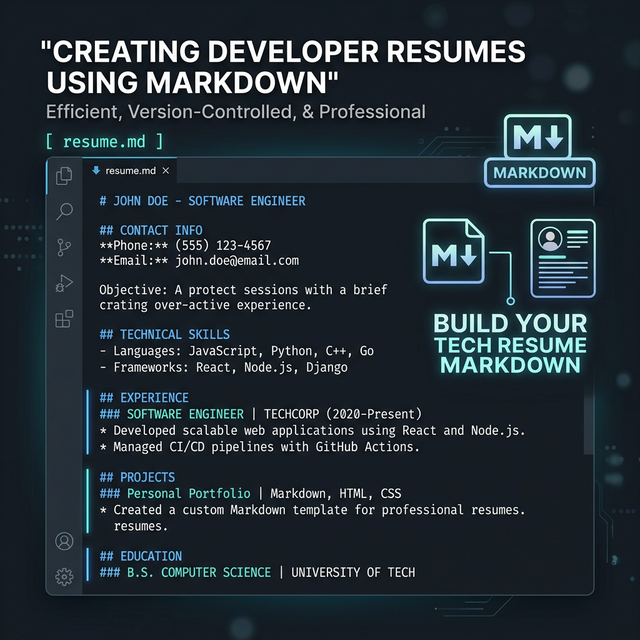
Here’s how it might look inside a Markdown file:
# John Doe
**Backend Developer**
New York, USA
john@email.com | github.com/johndoe | linkedin.com/in/johndoe

## Professional Summary
Backend Developer with 3+ years of experience building scalable APIs using Node.js and PostgreSQL. Passionate about writing efficient and maintainable code.

## Technical Skills
### Languages
- JavaScript
- Python

### Frameworks
- Node.js
- Express

## Work Experience
### Backend Developer – Tech Startup
*2021 – Present*
- Designed REST APIs used by 20k+ users.
- Improved database performance by 25%.
Clean. Direct. Easy to scan.
Tips to Make It Even Better
1. Tailor It for Each Role
If you’re applying for a backend role, highlight backend technologies first. If it’s frontend, reorder your skills. Small adjustments can make a big difference, even if it seems minor.
2. Keep It to One Page (If Possible)
If you have less than 7 years of experience, one page is usually enough. Recruiters don’t read every single line carefully, they skim.
3. Avoid Buzzwords
You don’t need phrases like: "Highly motivated, results-driven, dynamic professional..." It sounds forced. Just write like a normal person.
4. Host It on GitHub
- Create a repository called
resume. - Add your
README.md. - Pin it to your profile.
Now when someone checks your GitHub profile, they instantly see a professional resume.
Converting It to PDF
Most companies will still ask for a PDF version. You can convert your Markdown resume using:
- VS Code extensions
- Online Markdown tools
- Pandoc
Just double-check the layout before sending it. Sometimes spacing can look a little off after conversion. Using a reliable markdown to pdf convert tool makes this process seamless and ensures your formatting stays perfect.
Common Mistakes to Avoid
- Listing every single technology you ever touched
- Writing huge paragraphs
- Adding outdated skills
- Making formatting inconsistent
- Trying to make it look like a design portfolio
Remember — it’s a resume, not a startup landing page.
Final Thoughts
Creating a developer resume using Markdown is not about being fancy. It’s about being practical and aligned with how developers actually work.
- It keeps things clean.
- It’s easy to maintain.
- It reflects your technical mindset.
Markdown alone won’t get you hired, of course. But presenting your experience clearly and confidently? That definitely helps.
And sometimes, simple is way more powerful than complicated.