Why Markdown Won the Documentation War: A Deep Dive into the Developer Psyche
If you walked into a software company in 2005, the documentation landscape was a desolate wasteland of binary formats. Specifications lived in Microsoft Word files (.doc). These files lived on shared network drives with names like Z:\Docs\Project_Titan\Spec_v2_FINAL_revised_AGAIN.doc.
They were emailed back and forth. They were full of conflicting comments. They were heavy, slow to open, and usually corrupted by the third revision. If you wanted to read them on a Linux machine, you had to install OpenOffice and pray. If you wanted to diff them to see what changed between version 1.1 and 1.2, you were out of luck.
Fast forward to today. If you enter a modern software company—whether it's a startup in a garage or a giant like Google, Stripe, or Netflix—documentation lives in Markdown.
It lives in the Git repository, right next to the source code. It is compiled into beautiful static websites using tools like Docusaurus or Hugo. It is vetted through Pull Requests.
How did a simple text-to-HTML conversion tool created by a blogger (John Gruber) in 2004 defeat the billion-dollar behemoth of Microsoft Word? How did it become the lingua franca of the entire technical world?
It wasn't an accident. It was a revolution born of necessity.
In this essay, we are going to explore the deep psychological and technical reasons why developers fell in love with Markdown—and why, despite its limitations, it is likely to remain the standard for the next 50 years.
Part 1: The "Docs as Code" Philosophy
The single biggest shift in the software industry over the last 15 years hasn't been a specific language or framework; it's been a mindset shift regarding documentation. We stopped treating documentation as a separate "administrative task" performed by writers in a silo, and started treating it as a core part of the software product.
This philosophy is called Docs as Code.
The core tenet is simple: Documentation should be written, tested, and deployed using the exact same tools as the code it describes. This principle is especially powerful for API documentation, where consistency and accuracy are non-negotiable.
When you adopt Markdown, you unlock the entire ecosystem of modern software engineering tools:
1. Version Control (Git) is Non-Negotiable
Developers live in Git. We need to know who changed a line, when they changed it, and why (the commit message). We need to be able to revert a substantial change if it turns out to be wrong.
Microsoft Word is a "binary blob." To Git, a Word doc is just a black box. If you change one comma in a 500-page Word doc, Git sees the entire file as "modified." You cannot see a diff. You cannot merge two people's changes automatically.
Markdown is plain text. Git loves plain text. If I change a sentence in paragraph three, Git highlights exactly that line. I can merge my changes with yours seamlessly. This capability alone makes Markdown the only viable choice for collaborative technical writing.
2. Code Review (Pull Requests)
In the old days, reviewing a document meant turning on "Track Changes" in Word, emailing it to five people, and getting five different files back. Merging those comments was a nightmare.
With Markdown, I open a Pull Request (PR) on GitHub. My team can comment on specific lines of the documentation just like they comment on code. We can have a threaded discussion about the wording of an API endpoint description directly in the context of the change.
3. Automated Testing (CI/CD)
This is where it gets really powerful. Because Markdown is structured text, we can parse it. We can write tests for our documentation.
- Link Checking: We can have a CI script that scans every Markdown file and pings every URL. If a link returns a 404, the build fails. We literally cannot publish broken documentation.
- Style Linting: Tools like
markdownlintorValecan enforce style guides. "Don't use the word 'slave', use 'replica'." "Don't use 'guys', use 'everyone'." The computer enforces the style guide, so humans don't have to nitpick.
Part 2: Reduced Cognitive Load and Flow State
Developers spend their entire working lives inside text editors (VS Code, Vim, IntelliJ, Emacs). These environments are dark, minimalist, and highly customized to the individual's workflow. We use monospaced fonts. We use keyboard shortcuts for everything.
Switching context is expensive. It takes a human brain about 23 minutes to fully refocus after an interruption.
Opening Microsoft Word is a heavy context switch. It is a completely different paradigm. The UI is bright (usually). It is cluttered with ribbons, menus, rulers, and buttons designed for making birthday cards and flyers. It takes 10-15 seconds to load.
Markdown respects the Flow State.
When I am writing code and I need to update the README, I don't leave my editor. I just open a new tab, type # New Feature, and keep typing. I don't touch my mouse. I don't look for a "Heading 1" button. I just type.
The syntax itself is designed to be "invisible."
- To make something bold, you wrap it in stars:
**bold**. This mimics the way we might emphasize text in an email or a sticky note. - To make a list, you just use dashes:
- item. - To cite code, you use backticks:
`code`.
This might seem trivial, but for a developer who types 100 words per minute, these micro-frictions add up. Markdown feels like an extension of coding, not a distraction from it. It allows us to capture our thoughts at the speed of typing, without fiddling with the presentation layer.
Part 3: Portability and the Fear of Lock-in
If you have been in tech for long enough, you have been burned by a proprietary format. You have a Lotus 1-2-3 spreadsheet you can't open. You have a WordPerfect file that looks like garbage in Word. You have a Visio diagram that you can't edit on a Mac.
Proprietary formats die. Companies go bankrupt. Software becomes obsolete. Licensing models change (looking at you, Adobe).
Plain text never dies.
A Markdown file written in 2024 is technically just a UTF-8 text file. It is compatible with the ASCII standard from the 1960s. You could open a Markdown file on a mainframe from 1980, and it would be readable. You will be able to open it on a quantum computer in the year 2050.
For developers, who often build systems meant to last for decades (banking, infrastructure, healthcare), this longevity is critical. We define our infrastructure in text (Terraform). We define our containers in text (Dockerfiles). It only makes sense that we define our knowledge in text.
By using Markdown, we own our data. We are not beholden to Notion, or Evernote, or Google, or Microsoft. If we want to move from GitHub to GitLab? Just copy the files. If we want to move from Jekyll to Hugo? Just copy the files.
This freedom is intoxicating.
Part 4: The Static Site Generator Ecosystem
Markdown is the fuel for the modern web. We don't just "write" Markdown and leave it as a text file; we compile it.
This is another concept developers love: Compilation.
Tools like Jekyll, Hugo, Docusaurus, Gatsby, and Eleventy take a folder of raw Markdown files and transform them into a blazing-fast, SEO-optimized, accessible website.
This workflow allows for incredible flexibility.
Case Study: Stripe Documentation
Stripe is famous for having the best documentation in the world. Their docs are not written in a WYSIWYG editor. They are written in Markdoc (a flavor of Markdown). They wrap the content in custom React components.
Because Markdown allows for HTML HTML-re-entry (you can write raw HTML inside Markdown), you can build interactive widgets right inside your docs. You can have a live API explorer next to your code snippet.
This "Markdown + Components" architecture (often called MDX) is the cutting edge of web development. It allows writers to focus on content while developers build the interactive shell.
The Simplified Workflow:
- Write: I create
post.mdin my editor. - Push: I
git pushto GitHub. - Build: Vercel or Netlify detects the push, spins up a container, runs the build script (which converts MD to HTML), and deploys the files to a CDN.
- Live: The world sees the update in 30 seconds.
There is no database to hack (no SQL injection). There is no WordPress admin panel to brute-force. There is no server to patch. It is just static files. It is fast, secure, and cheap (often free).
Part 5: Focus on Content over Presentation
In Word or Google Docs, you spend 50% of your time fighting the Layout Engine.
- "Why did this image jump to the next page?"
- "Why is this bullet point indented differently than the one above it?"
- "Why did the font change to Calibri?"
- "How do I move this table without breaking the universe?"
In Markdown, you cannot control the specific visual layout. And that is a feature, not a bug.
It forces strict Separation of Concerns.
- The Writer is responsible for the Semantic Structure (This is a H1. This is a list. This is a quote).
- The System (CSS) is responsible for the Visual Presentation (H1s are 24px bold. Lists have 1rem padding).
This means the writer can't "mess up" the design. They can't choose a weird font. They can't make the text pink. They can only write.
For large organizations, this is crucial. It ensures that the documentation looks consistent across 10,000 pages, regardless of which engineer wrote it. A page written by a junior dev looks visually identical to a page written by the CTO.
Part 6: The Future of Markdown
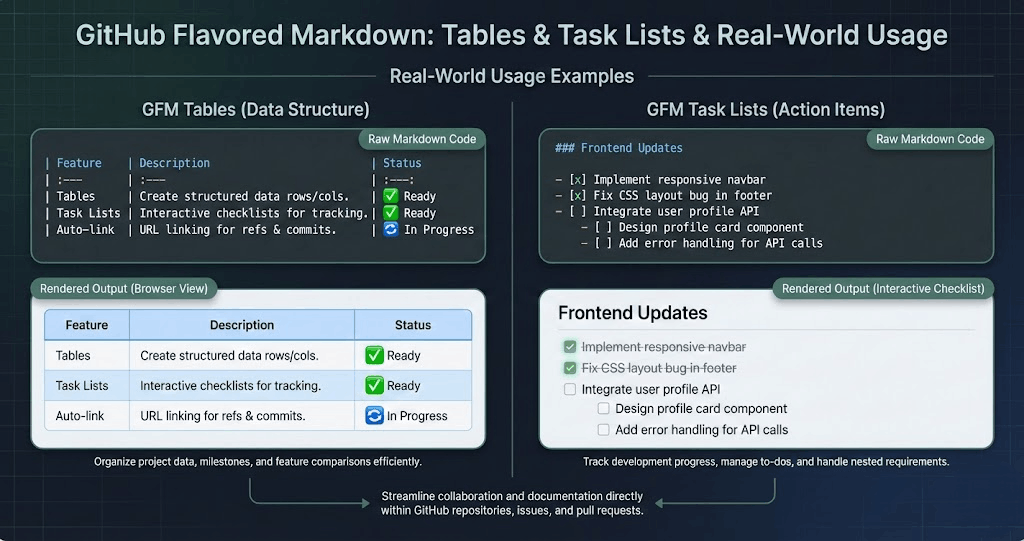
Is Markdown perfect? No. The standard is fragmented. There is "CommonMark," "GitHub Flavored Markdown," "MultiMarkdown," and dozens of others. Tables are still annoying to format without a plugin.
However, the ecosystem is converging.
MDX (Markdown + JSX) is likely the future. It allows you to import React components inside your Markdown. Imagine writing:
# Our Stock Price

Here is the chart for the last 30 days:

<StockChart symbol="AAPL" />
This renders a live, interactive D3.js chart in the middle of your document. This capability turns static documentation into interactive "notebooks" or dashboards, blurring the line between "app" and "doc."
Conclusion
Markdown didn't win because it was the most feature-rich format. It won because it was the most developer-compatible format.
It respected the tools we already loved (Terminal, Git, Text Editors). It respected our desire for automation and testing. It respected our need for ownership and portability.
If you are still writing software specifications in Word, stop. Give Markdown a week. You might miss the toolbar at first, but soon you'll realize the freedom of the blank, text-only canvas. You'll realize that by stripping away the "Rich Text," you have actually enriched your thinking.