Obsidian vs Notion: The Battle for Your Second Brain (A Developer's Perspective)
It's the question that tears productivity twitter apart every week: Obsidian or Notion?
If you ask a Product Manager, they will say Notion. It's pretty, it has databases, it collapses into a nice Kanban board. It's the "Lego of productivity."
If you ask a Software Engineer, the answer is usually irrelevant. They are probably using VimWiki or Emacs Org-Mode. But if they have to choose a modern tool, more and more are choosing Obsidian.
Why? Is it just hipster contrarianism? Or is there a fundamental technical reason why Obsidian resonates with the developer mindset?
In this comprehensive comparison, we aren't going to talk about "vibes." We are going to talk about Architecture. We are going to talk about Data Ownership. We are going to talk about Latency.
Part 1: The Architecture of Truth
The fundamental difference between Notion and Obsidian is where the truth lives.
Notion: The Cloud Database
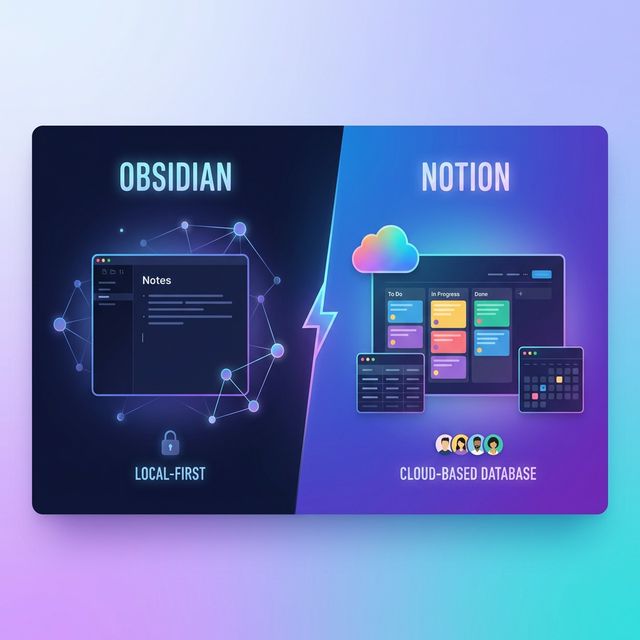
Notion is a web app. Even the desktop app is just a wrapped browser (Electron) pointing to their servers. Your data lives in a PostgreSQL database sharded across AWS regions. When you type a character, it is sent over the wire.
- Pros: Sync is magical. Collaboration is real-time (Google Docs style). You can access it from any browser.
- Cons: If Notion's servers go down, you can't work. If you have no internet on a plane, you are limited. And worst of all: You don't own your data. You can export it, sure, but the "native" format is a proprietary JSON structure.
Obsidian: The Local Folder
Obsidian is an IDE for your thoughts. It is an Electron app, yes, but it points to a local folder on your hard drive. Your "Vault" is just a folder. Your notes are just .md text files.
- Pros: 100% Offline. Blazing fast (zero network latency). You own the files. If Obsidian goes bankrupt tomorrow, you still have your files. You can open them in VS Code. You can grep them. You can commit them to Git.
- Cons: Sync is your problem (unless you pay for Obsidian Sync). Collaboration is basically impossible (it's single-player mode).
Winner: For developers who value sovereignty? Obsidian.
Part 2: The Data Structure (Markdown vs Blocks)
Notion uses a "Block" model. Everything is a block. A paragraph is a block. A header is a block. This allows for their cool drag-and-drop UI.
Obsidian uses Plain Text Markdown. It parses the file at runtime to render it.
Why does this matter? Interoperability.
I can write a Python script to scan my Obsidian vault, extract every line that starts with TODO, and email it to me. I can use standard Unix tools (sed, awk, grep) on my notes.
With Notion, I have to use their HTTP API. I have to handle rate limits. I have to parse their complex block JSON objects. It is a high-friction environment for hacking.
Part 3: The Plugin Ecosystem
Notion has an "Integration" marketplace. These are SaaS connections (Zapier, Slack, GitHub). They are external.
Obsidian has a Plugin architecture. Because Obsidian is built on web tech, plugins are just JavaScript. You can write a plugin that completely changes the UI, intercepts keystrokes, or renders 3D graphs.
The Developer's Dream
There is a plugin called Dataview in Obsidian. It allows you to write SQL-like queries inside your notes to dynamically list other notes.
```dataview
TABLE file.ctime as "Created"
FROM "Books"
WHERE rating > 4
SORT file.ctime desc
```
This turns your static folder of text files into a dynamic database, without the overhead of a real database. It is pure magic.
Part 4: The Graph View (Marketing vs Utility)
Obsidian is famous for its "Graph View"—that constellation of dots connecting your notes.
To be honest? It's mostly eye candy. It looks cool on Twitter. But practically, it does represent something profound: Bi-directional Linking.
In Notion, you have hierarchy (Page -> Subpage). It is a tree. In Obsidian, you have a network (Page <-> Page). It is a web.
For developers, who deal with graph structures (dependency trees, inheritance hierarchies) daily, the network model feels more natural. Our knowledge isn't a tree; it's a mess of connections.
Part 5: Performance and "Snappiness"
Notion is heavy. It's a full SPA loading massive libraries. Switching pages can take 500ms-1s. Obsidian is instantaneous. Opening a file takes 5ms.
When you are in a "Flow State," that 500ms lag breaks you. You want the tool to disappear. Obsidian disappears. Notion demands your attention ("Look at my pretty cover image!").
Part 6: Privacy and Security
If you are working on sensitive IP, or personal journals, do you want that stored on a VC-backed startup's servers unencrypted (at rest)? Notion employees can technically access your data (for support reasons, etc).
Obsidian is local. If you use Obsidian Sync, it is End-to-End Encrypted. The developers literally cannot read your notes. For the paranoid (Read: Security Conscious), this is the only option.
Part 7: The "Forever" Factor
Software dies. Evernote was the king. Then it died (slowly). Roam Research was the hot thing. Now it's fading.
If Notion shuts down in 2030, what happens? You have a 5GB zip file of JSON that nothing else can read.
If Obsidian shuts down? You have a folder of Markdown files. You open them in VS Code. You have lost nothing.
This is the Lindy Effect applied to notes. Plain text has survived 50 years. It will survive 50 more.
Part 8: FAQ for Developers
Q1: Can I sync Obsidian to efficient mobile apps?
Answer: Yes. The official Obsidian mobile app is surprisingly good. It's fully feature-complete (plugins work on mobile!). You can sync via iCloud (on iOS) or Obsidian Sync. Using Git on mobile is possible (via Working Copy app) but painful.
Q2: Can I publish my vault as a blog?
Answer: Yes! This is a huge trend. Obsidian Publish is their paid service, but there are free tools (like Quartz) that take your vault and turn it into a static site (Next.js/hugo). You literally just "write" in your personal wiki, and it deploys as your public blog.
Q3: Does Notion have code blocks?
Answer: Yes, and they are decent. They support syntax highlighting. But Obsidian's code blocks are better because they are just standard Markdown code fences. You can copy-paste them directly into your IDE without stripping Notion's metadata.
Q4: Which one is better for project management?
Answer: Notion. Hands down. If you need a Kanban board with assignees, due dates, and statuses shared with a team, use Notion. Obsidian has "Kanban" plugins, but they are hacky compared to Notion's native database views.
Q5: Can I use both?
Answer: Yes. Use Notion for "Multiplayer" (Team wiki, Sprint planning). Use Obsidian for "Single Player" (Deep thinking, code snippets, learning notes). Don't try to force one tool to do everything.
Q6: How do I backup Obsidian?
Answer: It's a folder. Point Google Drive/Dropbox/OneDrive at it. Or, better yet, initialize a git repo inside it and push to a private GitHub repo. git commit -am "daily notes" && git push.
Q7: What about images in Obsidian?
Answer: They are stored as files in your vault (usually in an attachments folder). This makes your vault size grow, but again, standard files. Notion hosts them on AWS S3.
Q8: Is Obsidian open source?
Answer: No. The plugins are, but the core app is closed source. This is a point of contention for FOSS purists (who prefer Logseq or Joplin). But the file format is open, which is the most important part.
Q9: How is the search?
Answer: superior. Because it's local indexing, searching 10,000 notes is instant. It supports regex search. Notion's search has improved but can still be slow and imprecise.
Q10: What is the learning curve?
Answer: Notion is easier to start (blocks are intuitive). Obsidian is harder. It looks barren at first. You have to "garden" it. You have to install plugins. It appeals to the "Tinkerer" personality type (which correlates highly with developers).
Conclusion
The battle between Notion and Obsidian is a battle between Convenience and Control.
Notion gives you a beautiful, collaborative, database-driven environment out of the box. Ideally suited for teams and structured data.
Obsidian gives you a raw, fast, private, extensible environment for text. Ideally suited for individual thinkers and long-term knowledge storage.
As a developer, my choice is clear. I live in text. I trust files. I use Obsidian.